
Work EdTech Case study
MedCompass
Making NEET counselling easier to navigate when every decision matters.
Overview
Making NEET counselling easier to navigate
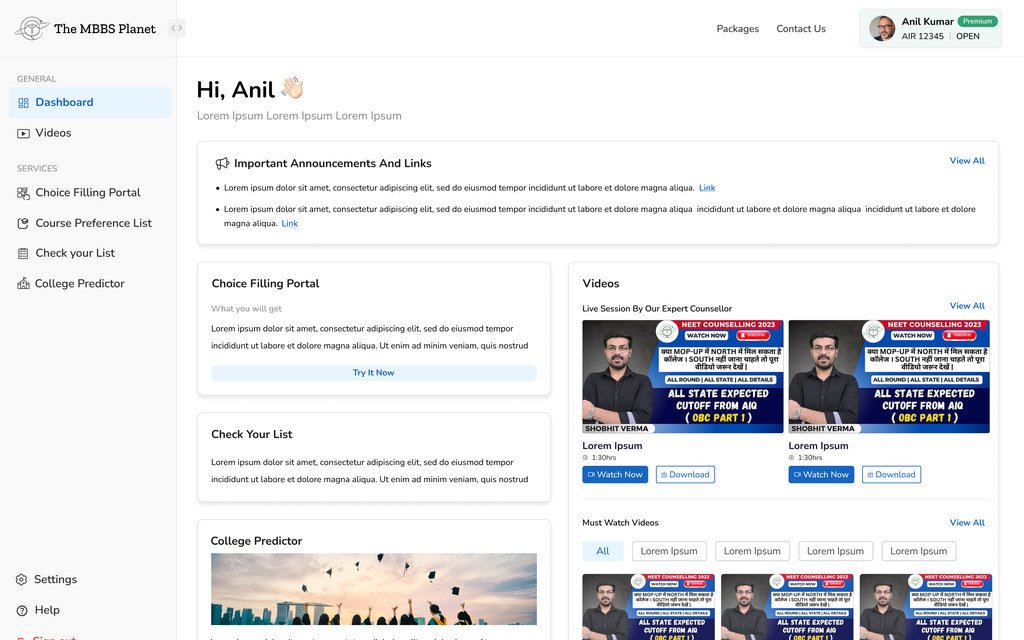
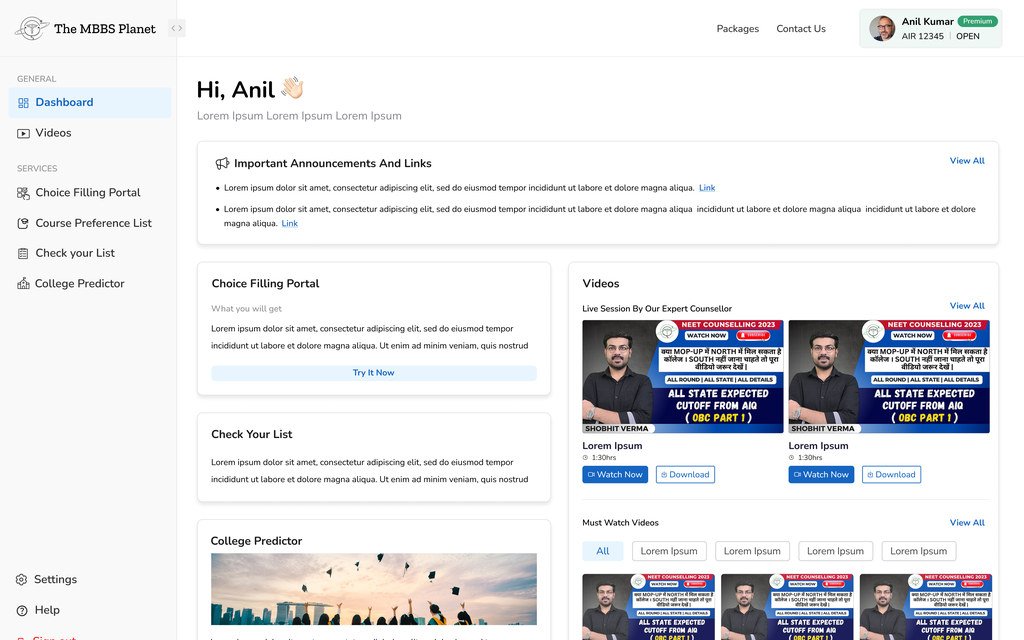
MedCompass is a web platform that makes the medical admission journey simpler for NEET aspirants. Built from scratch, it brings counselling, college prediction, choice filling and learning resources into one place.
The goal was a product students could trust, and find easy to use, when making admission decisions.
My role
I owned the design process from early discovery to developer handoff.
Starting from an early product idea, I researched how NEET counselling works, identified user and business opportunities, shaped the product structure, designed the end-to-end experience and visual system, tested the high-fidelity prototype, and refined it based on user feedback.
Design thinking process
I used research and iteration to move from a broad idea to a focused product.
I worked through the problem in five stages.
-
01
Understand
I studied the NEET counselling ecosystem, existing platforms, what students weigh up when choosing a college, and the full journey from getting a rank to final seat allotment.
Goal: Understand the problem before deciding what to build.
-
02
Define
Primary and secondary research surfaced the problems that kept coming up: scattered information, hard comparisons, anxiety about the preference list, and a need for clearer guidance.
Goal: Separate the real user problem from assumptions about the solution.
-
03
Explore
I turned those findings into product principles, information architecture, core journeys and feature ideas.
Goal: Decide where the product could take the most effort out of counselling.
-
04
Design
I moved from flows and wireframes to a high-fidelity interface and a reusable design system.
Goal: Turn a complex counselling journey into something structured and easy to follow.
-
05
Validate & Iterate
I tested the high-fidelity prototype with 25 medical aspirants and 10 parents, then used what I learned to refine onboarding, Choice Filling, and the path from free to paid.
Goal: Check whether users understood the experience, not just whether they could navigate it.
The opportunity
Admission information is scattered everywhere.
Students switch between counselling portals, cut-off databases, YouTube channels, WhatsApp groups and consultant websites to find reliable information. All that switching is tiring, adds doubt, and makes it harder to choose well.
So the job wasn’t to design another education website. It was to make a complicated, high-stakes decision easier to work through.
Key objectives
The product had to support the whole counselling journey, not solve one isolated task.
-
Make options relevant
Use each student’s situation to show colleges worth considering, instead of an endless directory.
-
Reduce decision fatigue
Show the information people need at each stage of counselling, when they need it.
-
Support comparison
Make it easier to weigh up colleges without jumping between sources.
-
Guide first-time users
Help aspirants who understand NEET but have never been through counselling before.
-
Build trust
Explain cut-offs, eligibility, fees, predictions and counselling information clearly enough for people to act on.
-
Create a scalable product
Build reusable patterns and a design system that can grow with more colleges, counselling rounds, services and features.
01 / The problem
One place to go for admission guidance.
The aim was a platform students would turn to first for medical admission guidance, with expert counselling, decision tools and learning resources together in one place.
Before designing anything, I wanted to understand how students move through the admission journey today, and where existing platforms get in their way. Because the product started from scratch, I combined secondary research, competitor benchmarking and domain analysis to find recurring user needs and business opportunities.
02 / Understanding the counselling journey
Separate features weren’t enough. The product had to connect the steps between them.
Students move through several stages: understanding their rank and eligibility, researching colleges, predicting realistic options, comparing them, building a preference list, and finally taking part in counselling.
Each stage raises different questions.
A college predictor, for example, is far more useful when a student can go straight from a predicted college to its details, compare it with another option, save it, and add it to their preference list.
That thinking shaped the product architecture.
03 / Competitor analysis
How existing platforms compare.
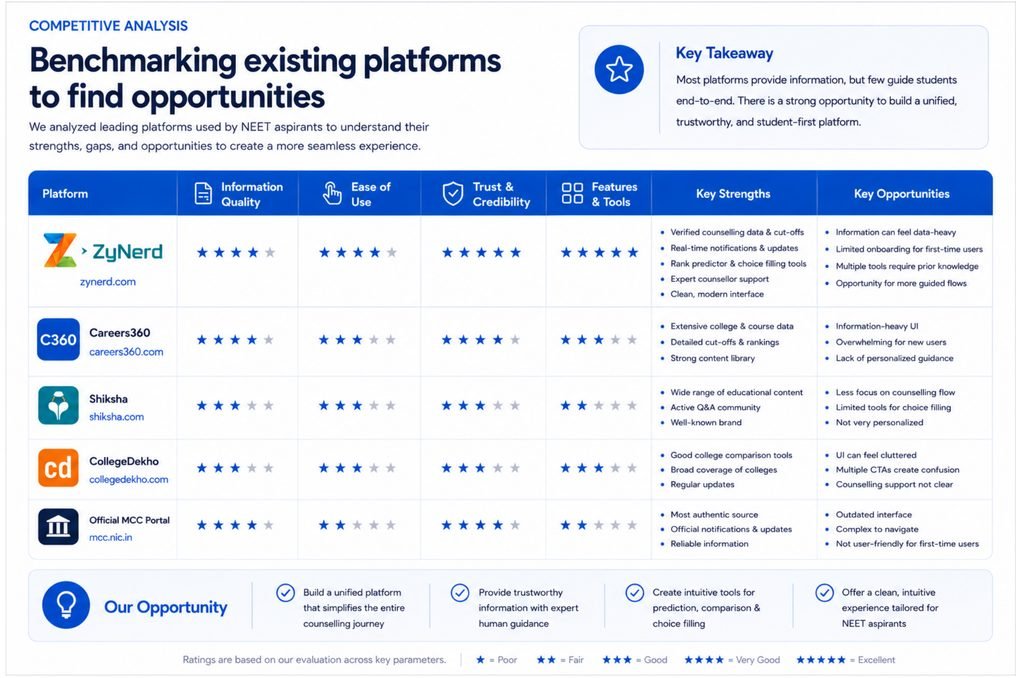
I looked at ZyNerd, Careers360, Shiksha, CollegeDekho, CollegeDunia and OurCounsellor, because together they cover the main ways students research colleges, check counselling information and look for guidance.
The comparison focused on the parts of the journey that mattered most for this product: finding colleges, counselling support, available data, comparison, prediction and decision-making tools.
What I found
Plenty of information, not much help deciding.
Most platforms were good at providing information, but it was spread across many features and pages. Students still had to make sense of cut-offs, fees, rankings, eligibility and college details on their own before they could tell whether an option was relevant.
Personalisation was the other gap. Prediction and counselling tools existed, but there was room to connect a student’s own situation to the rest of their journey, from finding realistic colleges to comparing them and ordering their final preferences.
So instead of competing with yet another large college database, I focused the product on three things: personalised recommendations, easier comparison and guided decision-making. The goal was to help students move from “Here are my options” to “These are the options that make sense for me.”
04 / Survey & research findings
What the survey told me
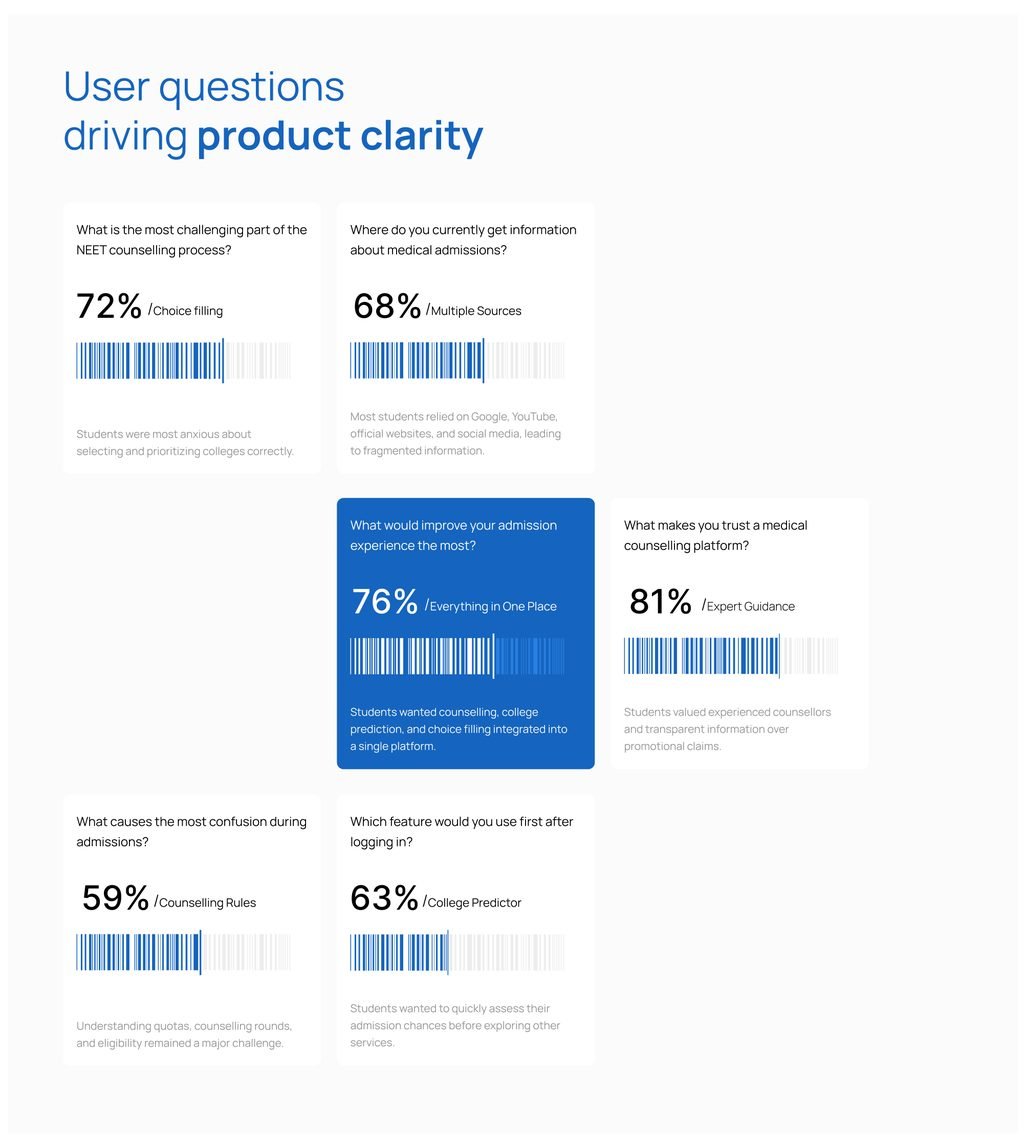
72%
Choice filling
The hardest part of NEET counselling. Students were most anxious about choosing and ordering colleges correctly.
68%
Multiple sources
Where students get admission information. Most relied on Google, YouTube, official websites and social media, so information was scattered.
76%
Everything in one place
What would improve the admission experience most. Students wanted counselling, college prediction and choice filling in a single platform.
81%
Expert guidance
What makes a counselling platform trustworthy. Students valued experienced counsellors and clear information over promotional claims.
59%
Counselling rules
The biggest source of confusion. Quotas, counselling rounds and eligibility were still hard to understand.
63%
College predictor
The first feature students would use after logging in. They wanted to check their admission chances before exploring anything else.
Bringing the findings together
Students didn’t need more information. They needed help turning information into decisions.
The competitor analysis showed the market already had plenty of information-rich platforms. The survey showed students were still struggling despite having all that information.
That changed my approach, from designing a college discovery platform to designing a guided counselling experience.
Research to product decision
Each finding shaped a design decision.
05 / Understanding the users
Two groups shaped the decision.
Aspirants mainly wanted to know: “What can I realistically get?” They needed relevant predictions, cut-offs, comparisons and clear next steps.
Parents looked at the same decision differently: “Is this actually a sensible choice?” Their concerns included fees, location, the college’s credibility and other practical questions.
Both groups wanted to feel sure they weren’t missing something important. So the experience needed to support both finding options and evaluating them.
Users
Primary and secondary personas
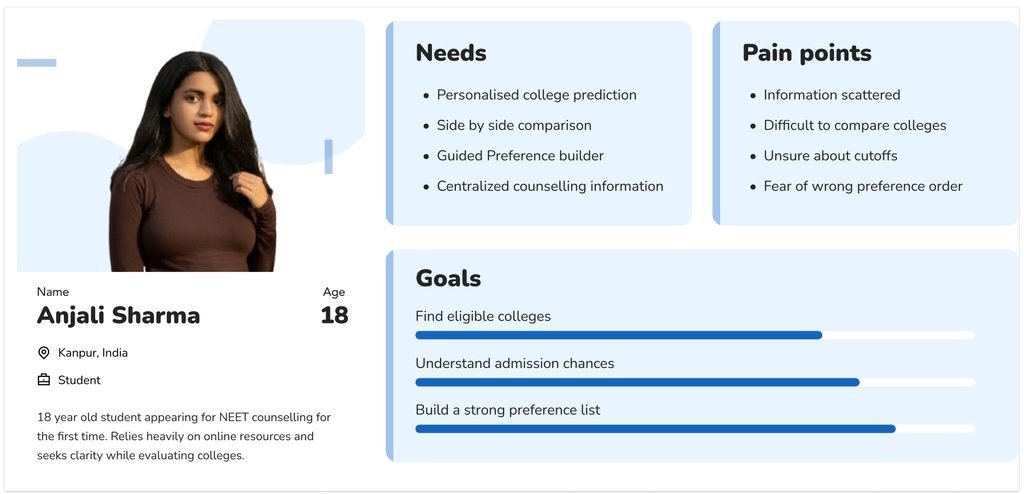
Primary persona
Anjali Sharma
Age 18 Kanpur, India Student
18-year-old student going through NEET counselling for the first time. Relies heavily on online resources and wants clarity while evaluating colleges.
Needs
- Personalised college prediction
- Side-by-side comparison
- Guided preference builder
- Centralised counselling information
Pain points
- Information scattered
- Difficult to compare colleges
- Unsure about cut-offs
- Fear of the wrong preference order
Goals
- Find eligible colleges
- Understand admission chances
- Build a strong preference list
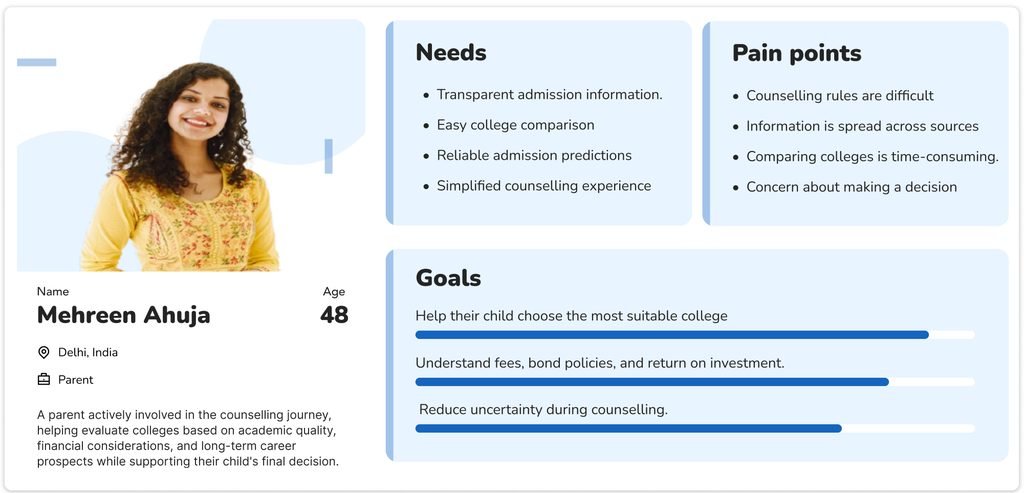
Secondary persona
Mehreen Ahuja
Age 48 Delhi, India Parent
A parent closely involved in the counselling journey, helping evaluate colleges on academic quality, cost and long-term career prospects while supporting their child’s final decision.
Needs
- Transparent admission information
- Easy college comparison
- Reliable admission predictions
- A simpler counselling experience
Pain points
- Counselling rules are difficult
- Information is spread across sources
- Comparing colleges takes time
- Worry about making the wrong decision
Goals
- Help their child choose the most suitable college
- Understand fees, bond policies and return on investment
- Reduce uncertainty during counselling
06 / Defining the problem
Research narrowed a broad counselling problem into five areas to act on.
-
Information fragmentation
Students used several platforms to gather counselling information, which made research repetitive and hard to keep track of.
-
Complex decision-making
Choosing a college meant weighing connected factors: cut-offs, quotas, fees, location and bond policies.
-
Difficult comparison
Students had to compare colleges by hand across many details.
-
Preference list anxiety
Students weren’t sure how to order colleges before submitting their final choices.
-
Need for guided support
Users wanted help making sense of their options, not another platform that simply lists information.
Problem statement
Medical aspirants find it hard to research, evaluate and prioritise colleges during NEET counselling. Information is fragmented, decisions depend on several connected factors, and there is little structured guidance.
As a result, building a well-informed preference list takes a long time and still feels uncertain.
07 / How might we
How might we help medical aspirants move from a NEET rank to a well-informed preference list with less uncertainty?
This became the central design question. Rather than trying to simplify every part of counselling, I focused on the stages where the product could save students the most effort.
- Discover
- Predict
- Compare
- Prioritise
08 / Design strategy
I turned the research into five design principles.
Instead of treating each finding as a separate feature request, I used them to decide how the product should behave.
-
Simplify College Discovery
Help students quickly find colleges that fit their rank, category and preferences.
-
Support Informed Decisions
Use admission data and predictions to explain the options, so users don’t have to interpret raw numbers themselves.
-
Enable Meaningful Comparison
Let students compare colleges on academic, financial, eligibility and personal factors in one place.
-
Guide Preference Building
Help students organise and refine their preference list before the official counselling process.
-
Reduce Cognitive Load
Break counselling information into clear steps and show detail only when it becomes relevant.
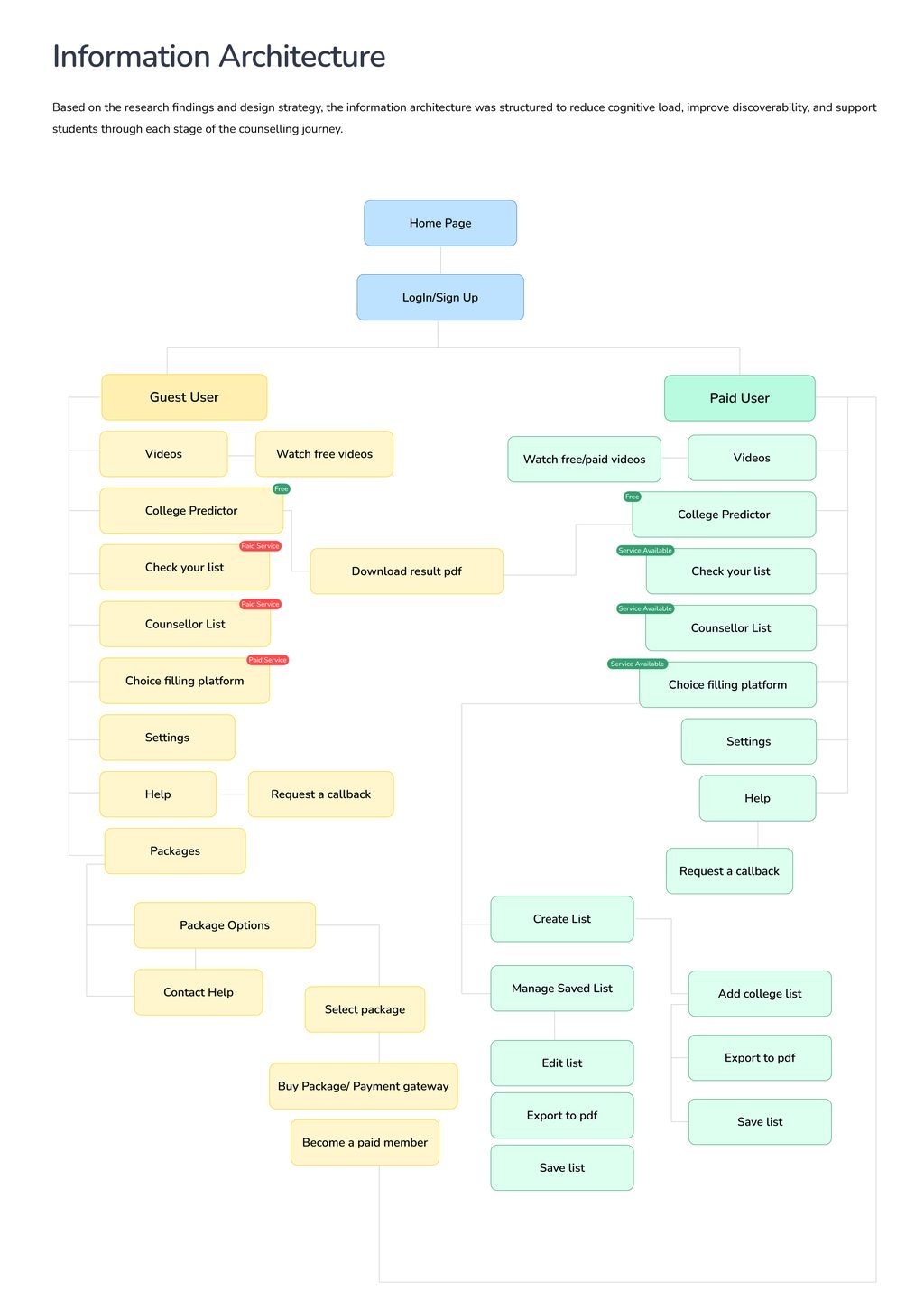
09 / Information architecture
Built around each stage of counselling.
Based on the research and design principles, I structured the information architecture to keep the load on students low, make features easier to find, and support them through each stage of counselling.
10 / Wireframes
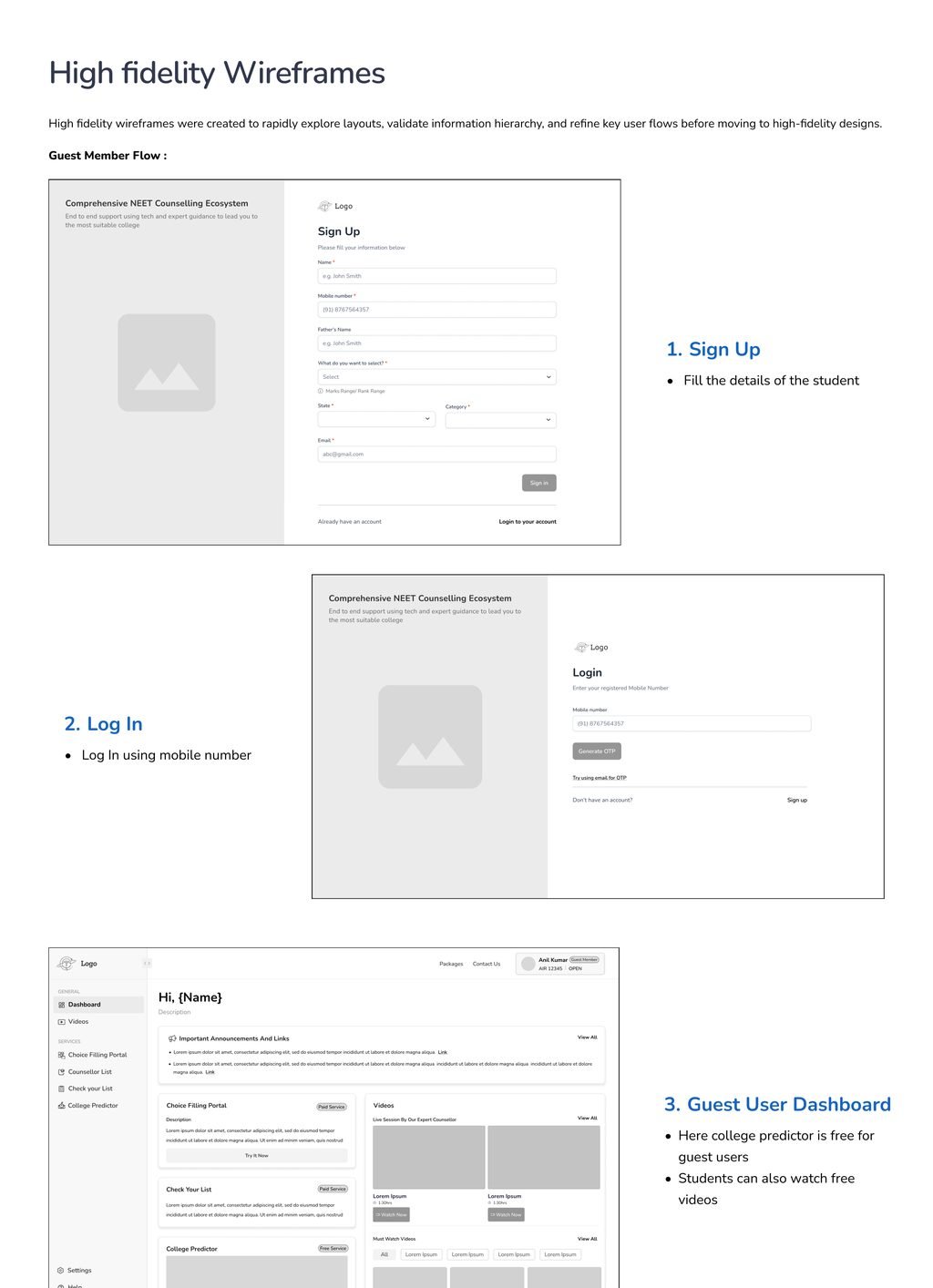
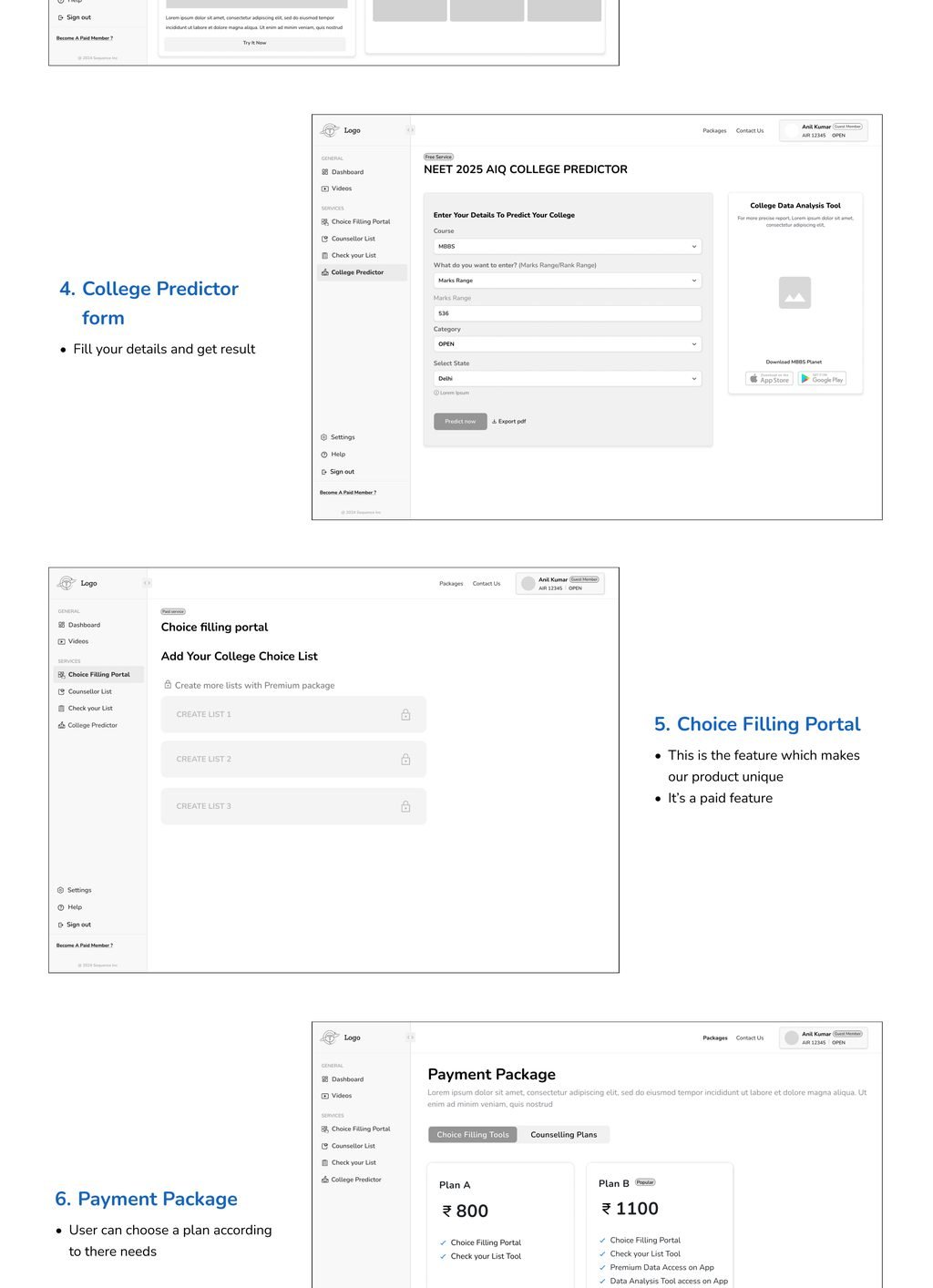
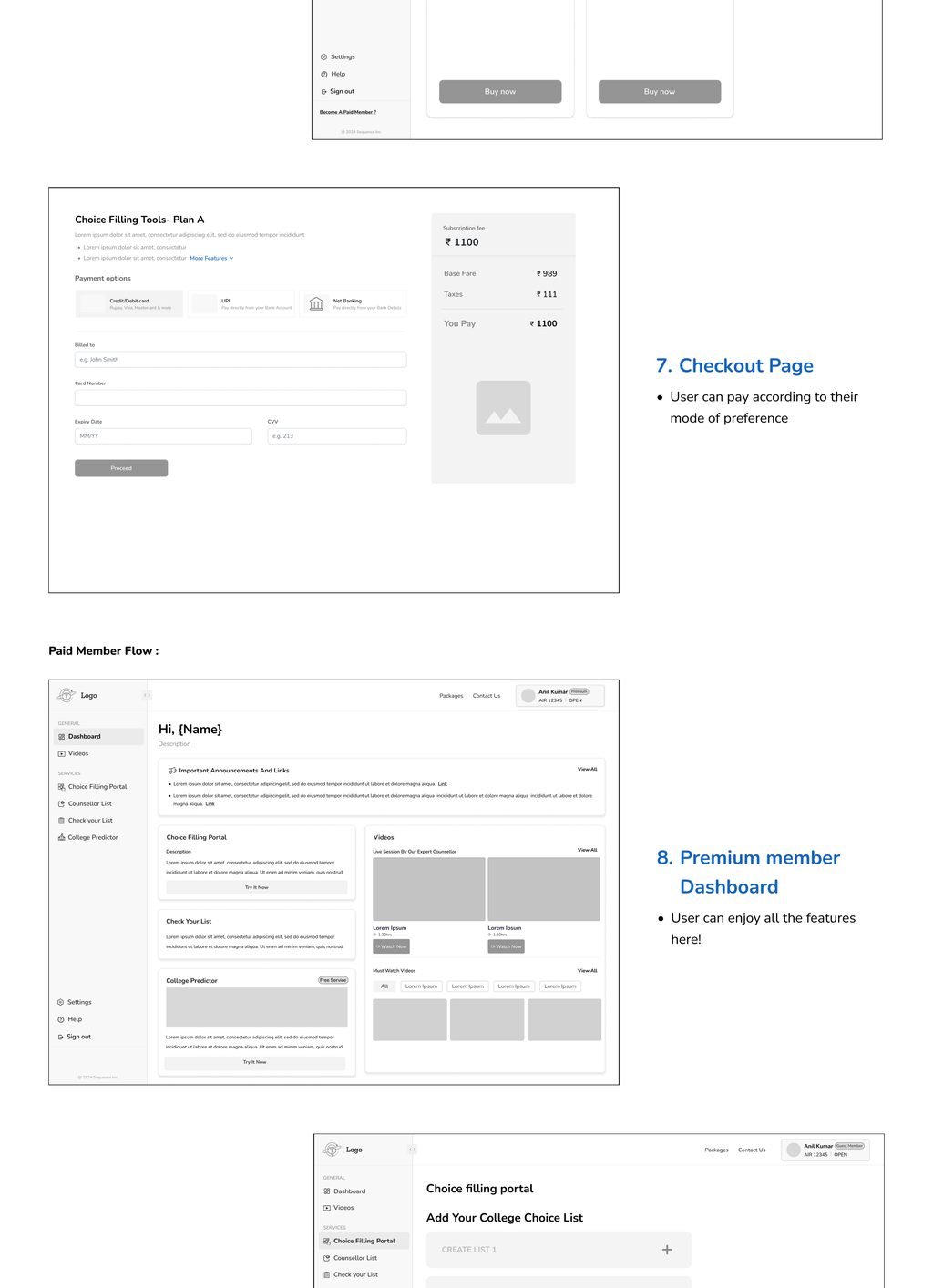
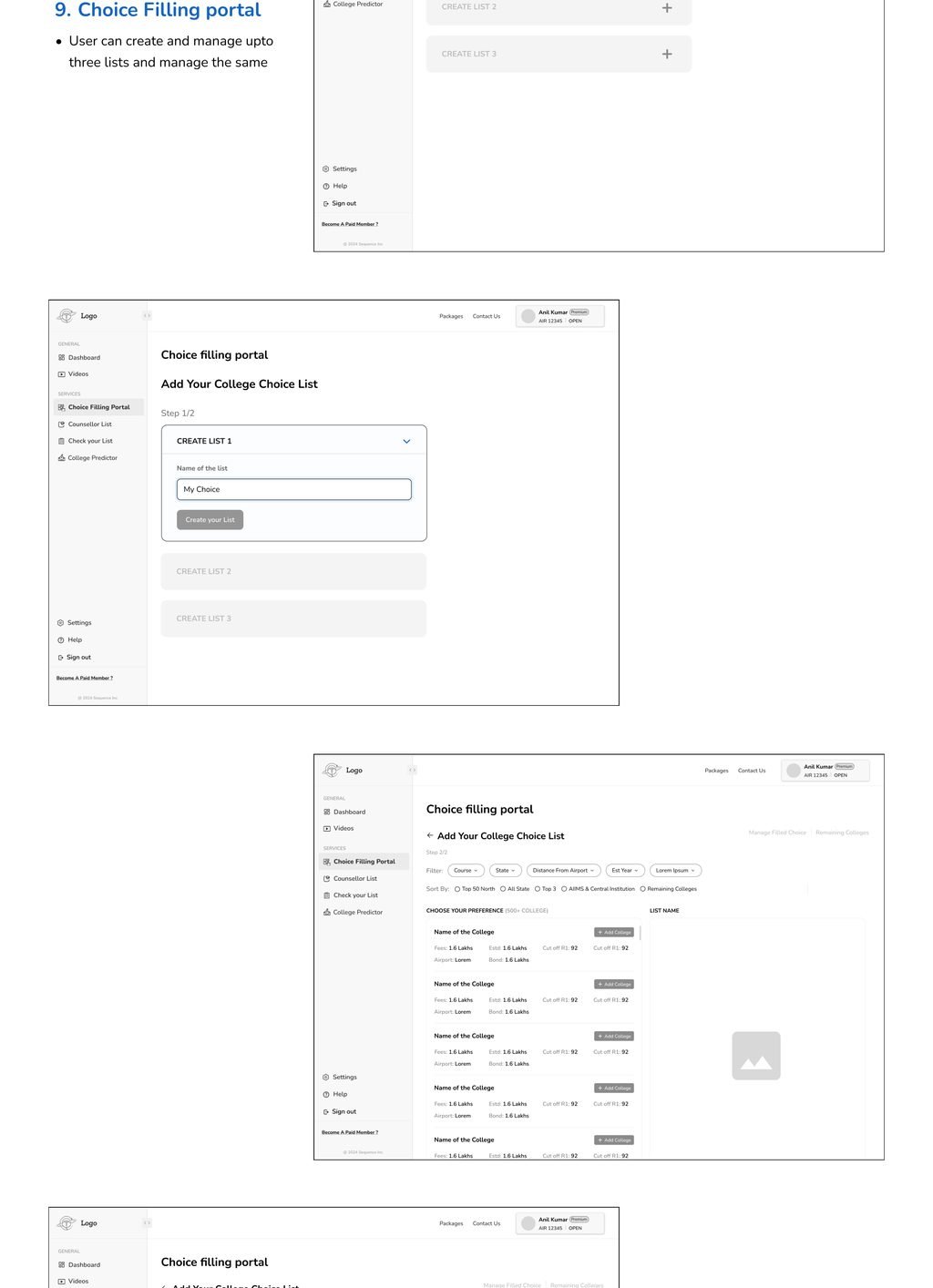
High-fidelity wireframes
I used high-fidelity wireframes to explore layouts quickly, test the information hierarchy and refine key flows before moving to final designs.
Scroll or use arrow keys
Final UI / The free tools
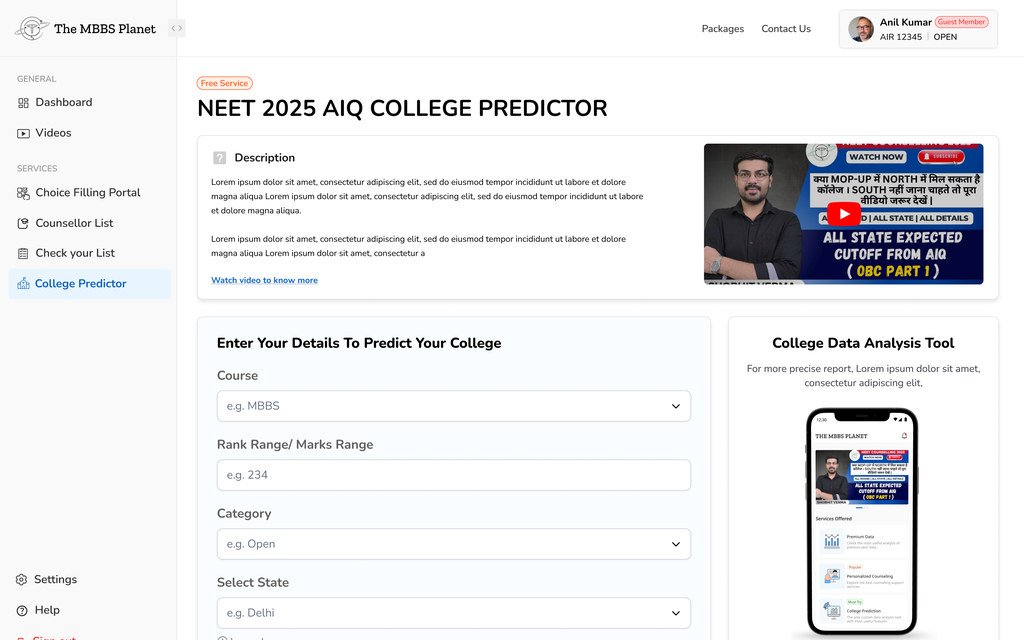
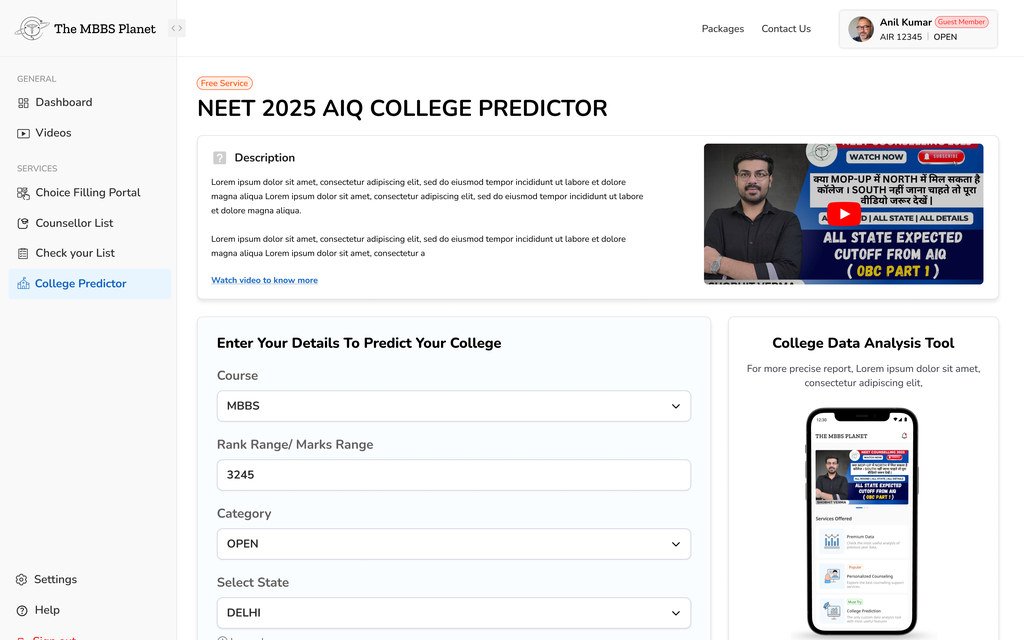
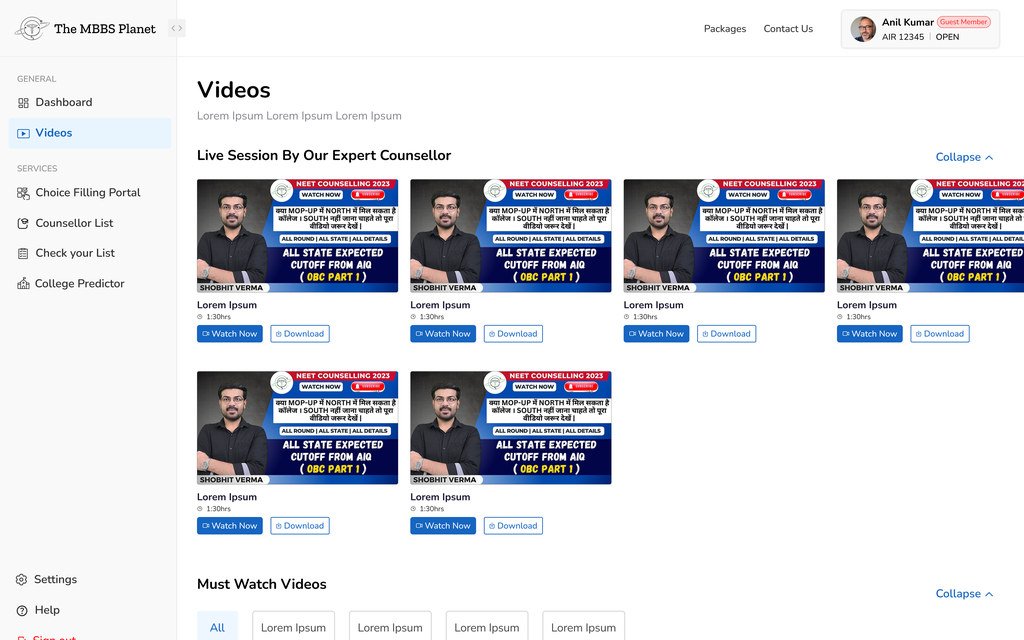
What a student can use before paying anything.
The College Predictor and the counselling videos are open to everyone. They are also the pages that have to earn enough trust for a student to go further.
Scroll or use arrow keys
Final UI / Choice filling
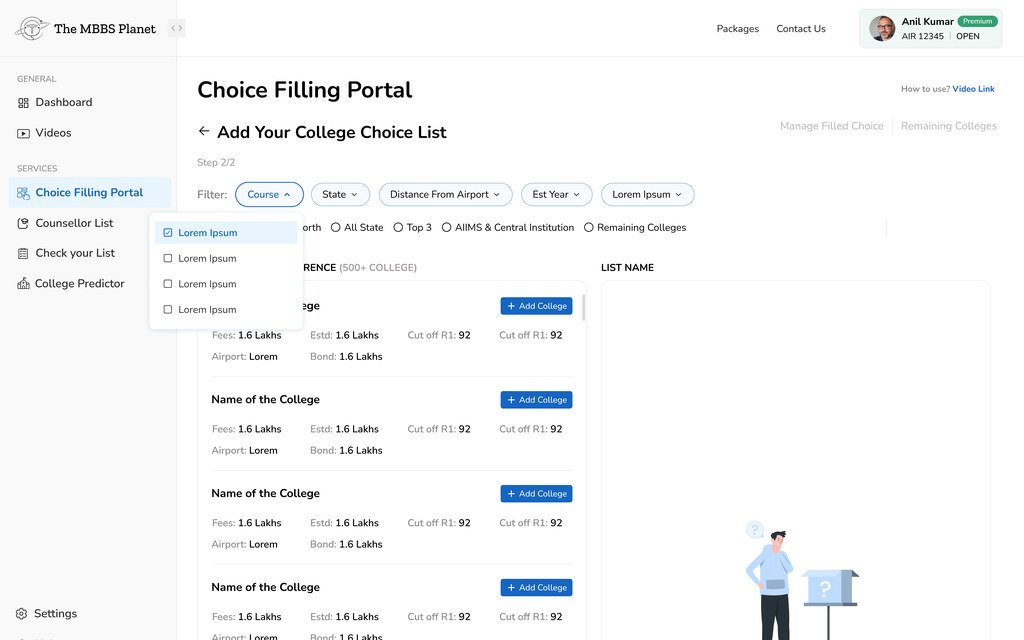
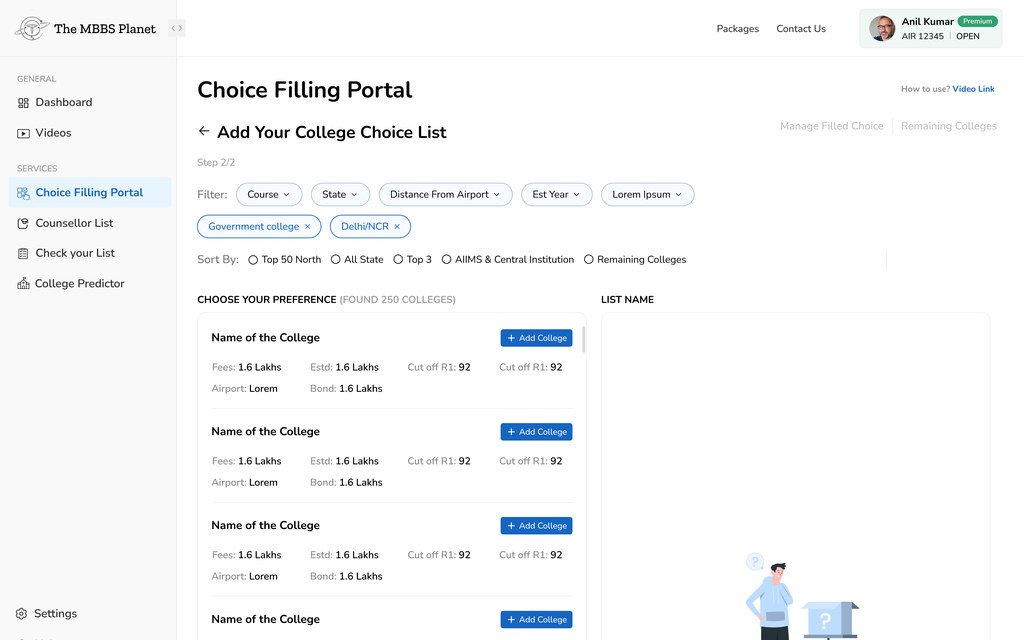
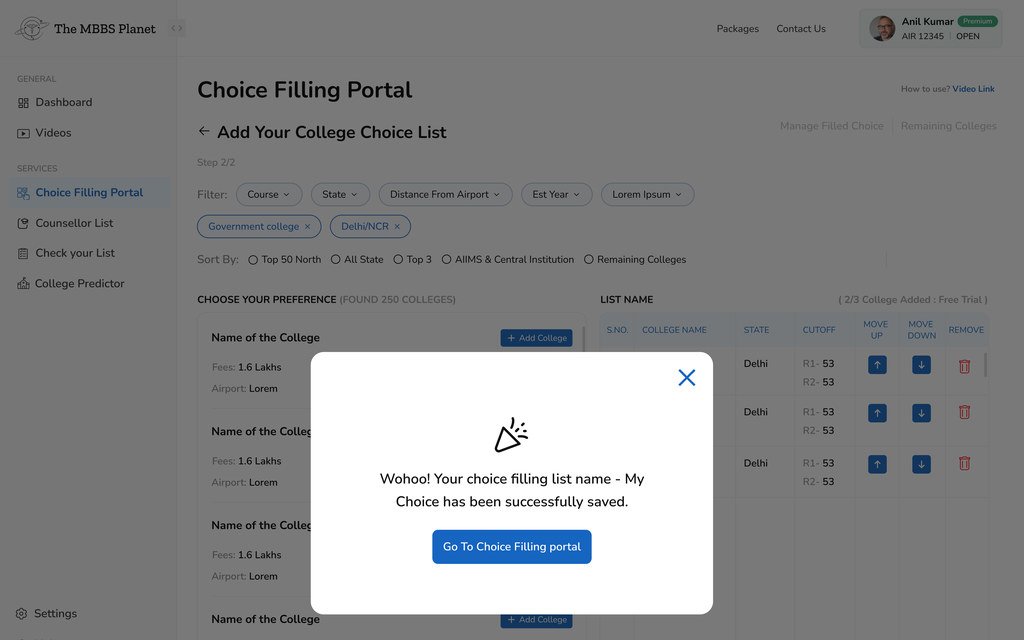
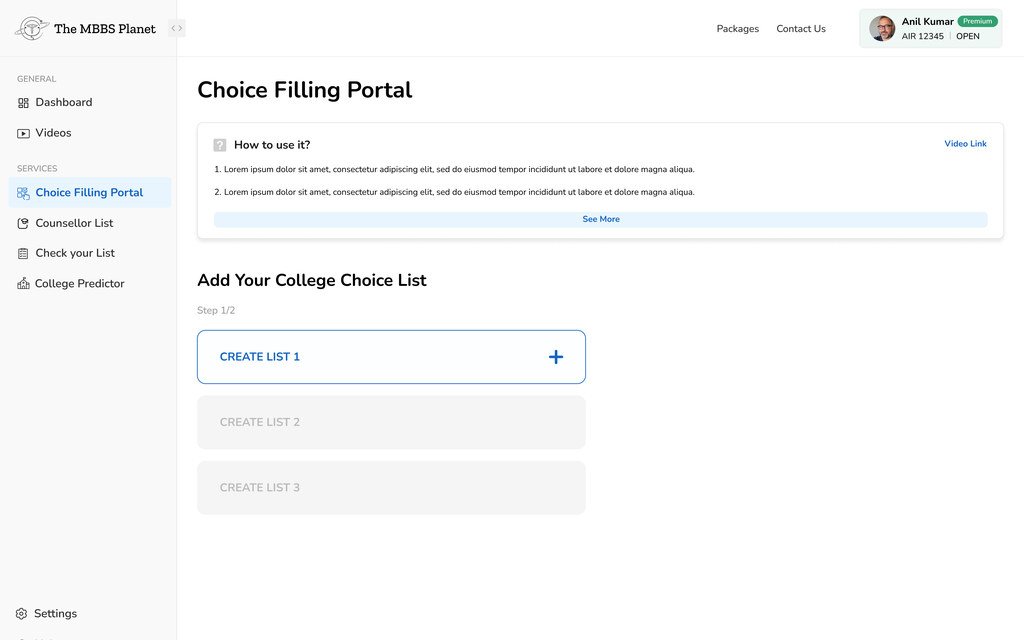
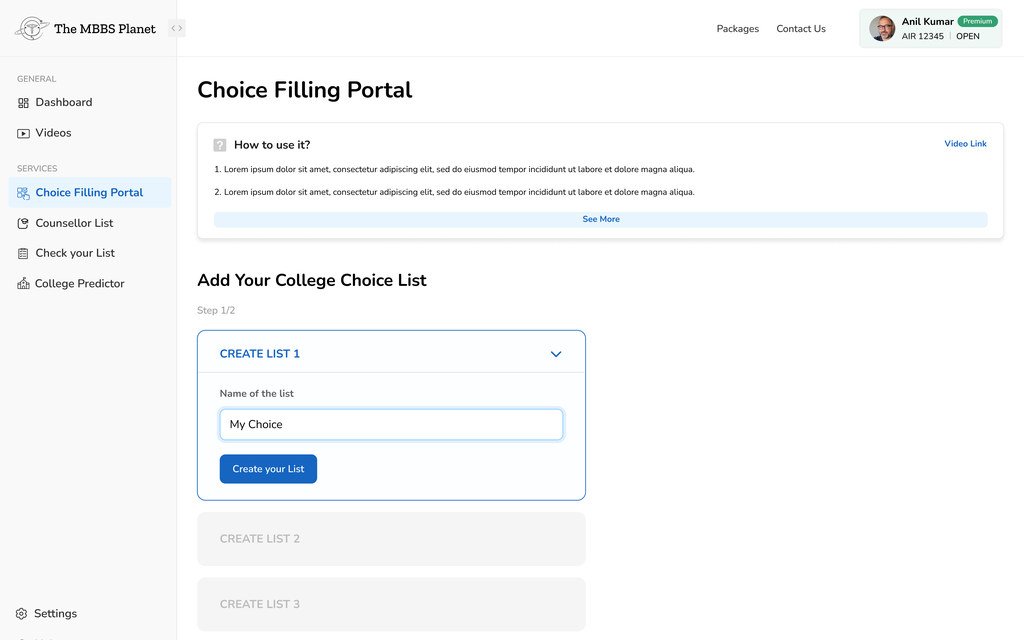
Building a college list that holds up.
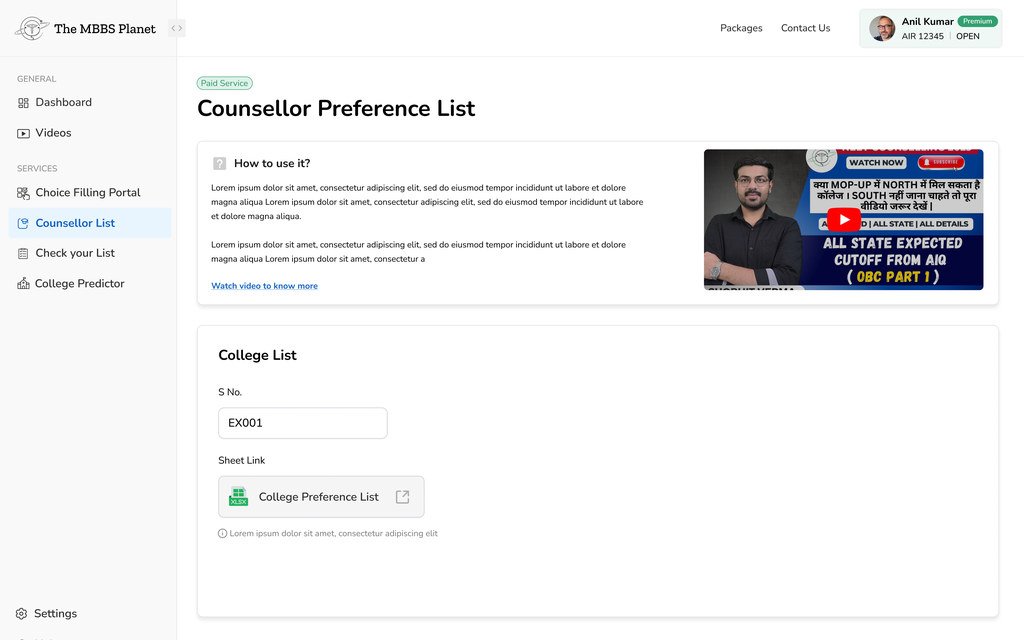
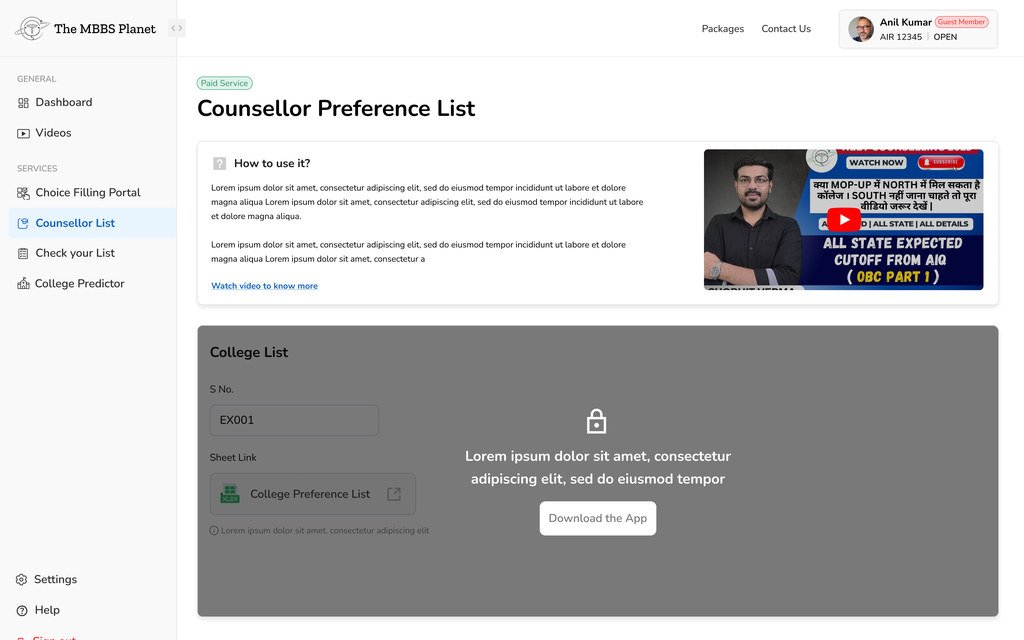
Choice filling is the part of counselling that decides where a student ends up. The portal lets them filter the whole list of colleges, add the ones that fit, order them, and keep up to three lists side by side.
Scroll or use arrow keys
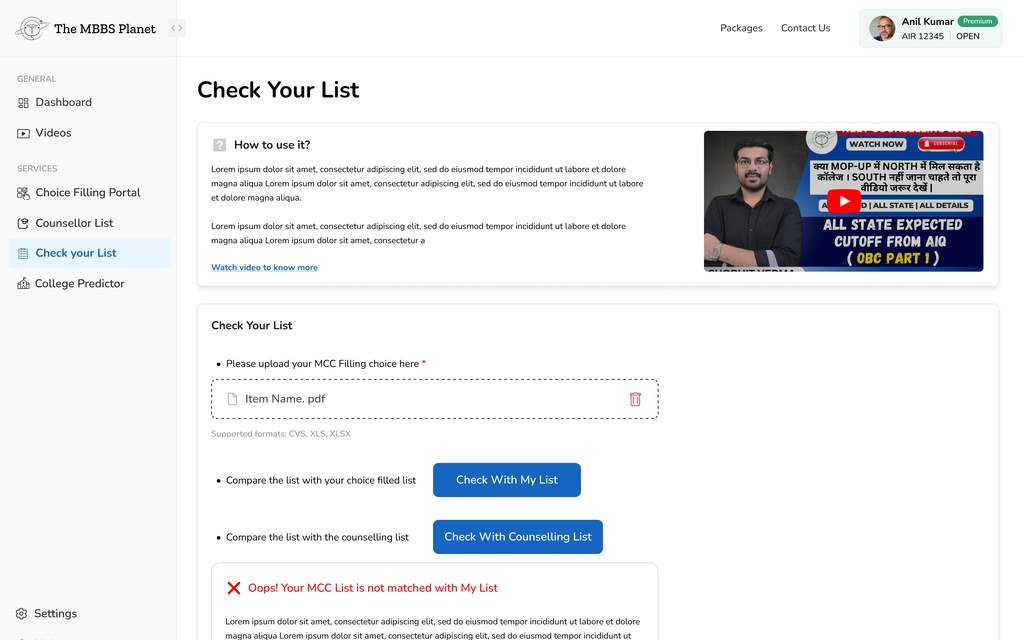
Final UI / Checking a filed list
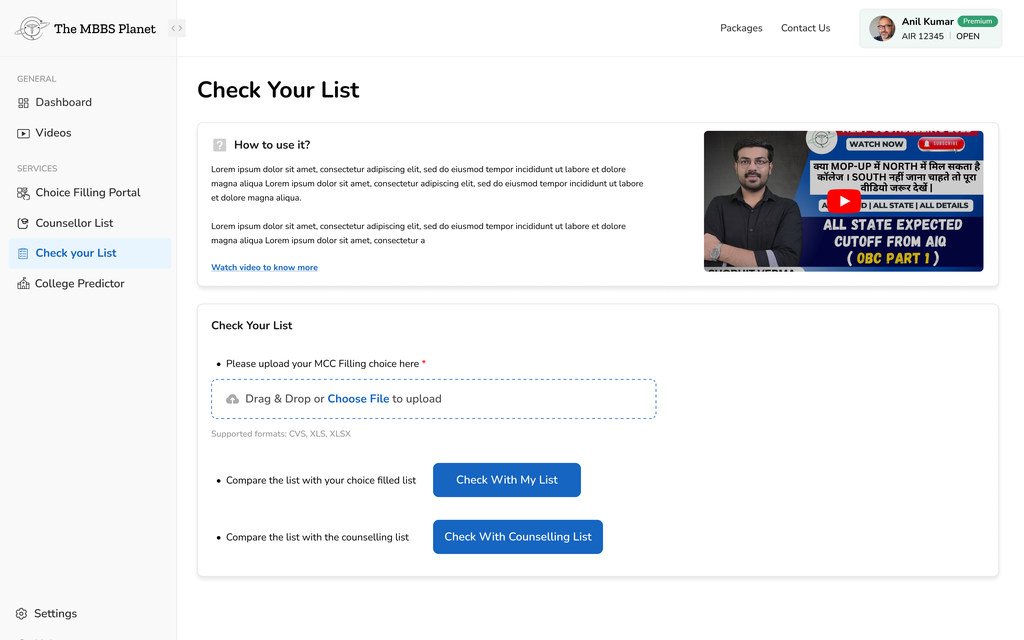
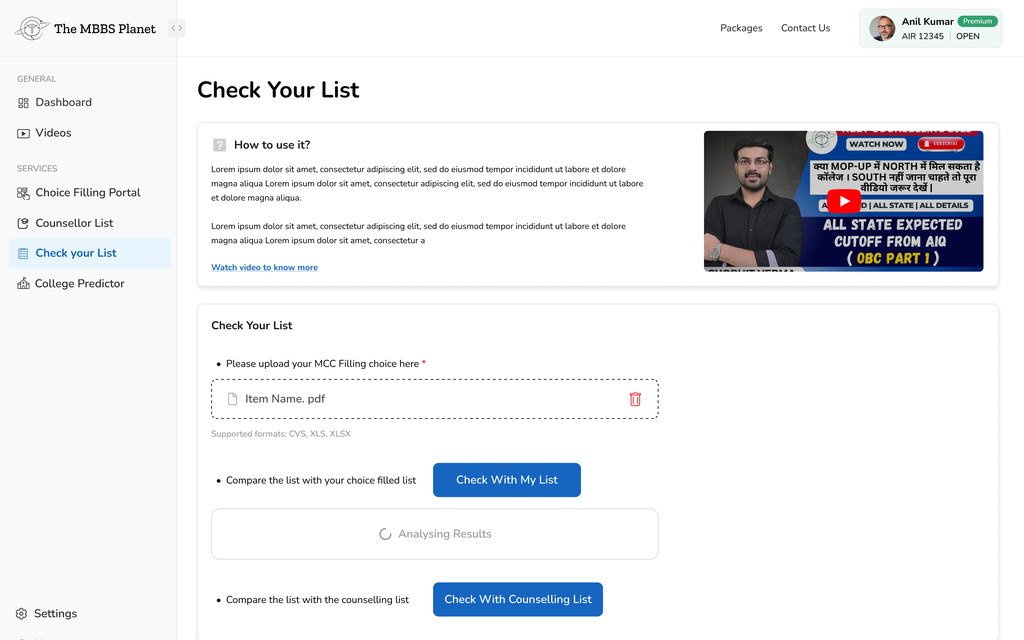
Comparing what a student filed with what they should have.
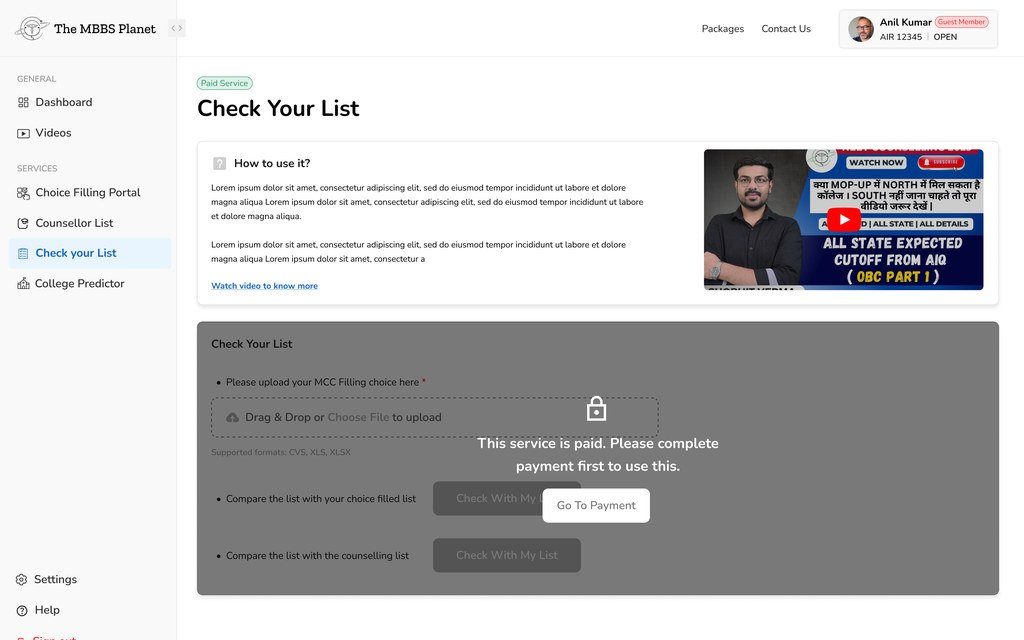
Check Your List takes the list a student actually submitted on the MCC portal and compares it against their own list, or against the counsellor’s.
Scroll or use arrow keys
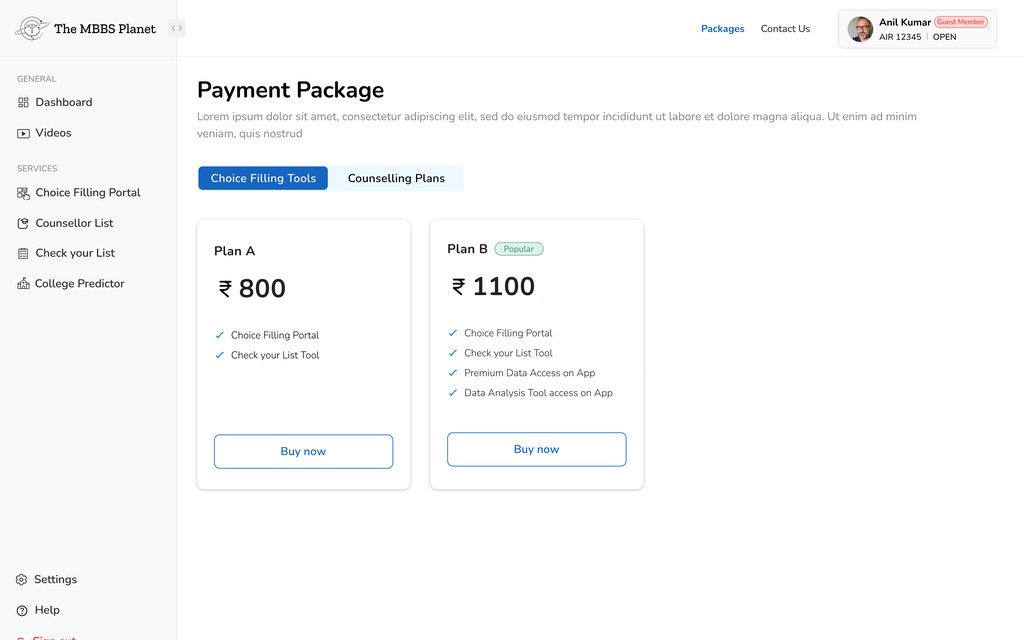
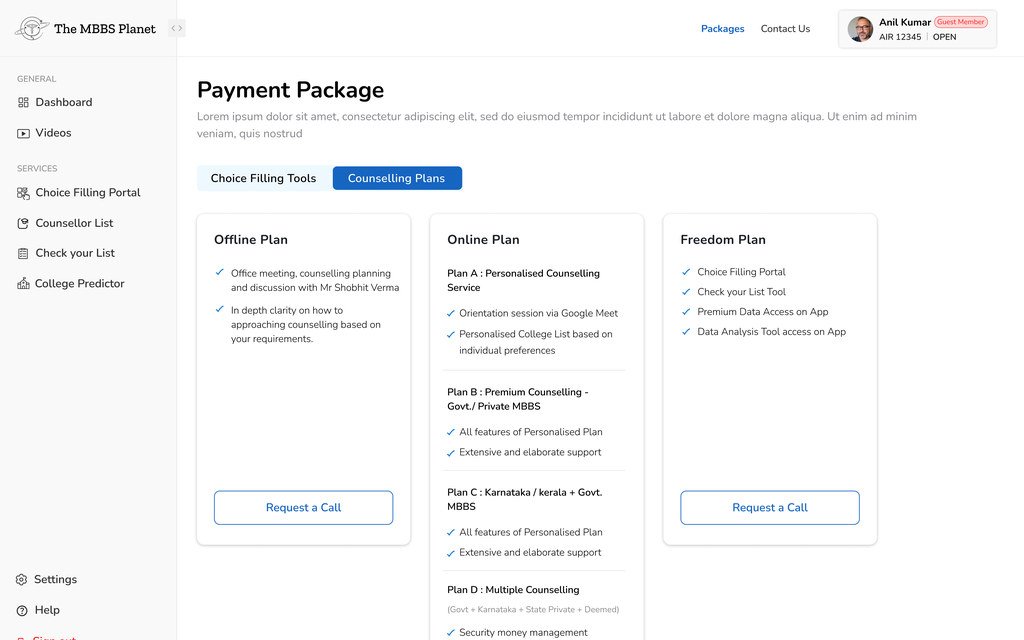
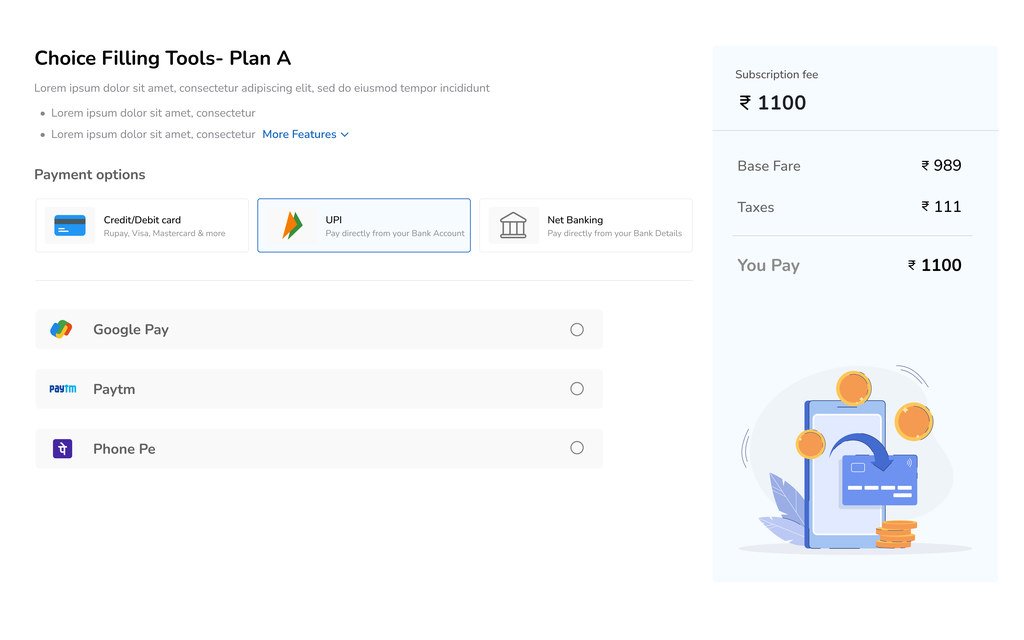
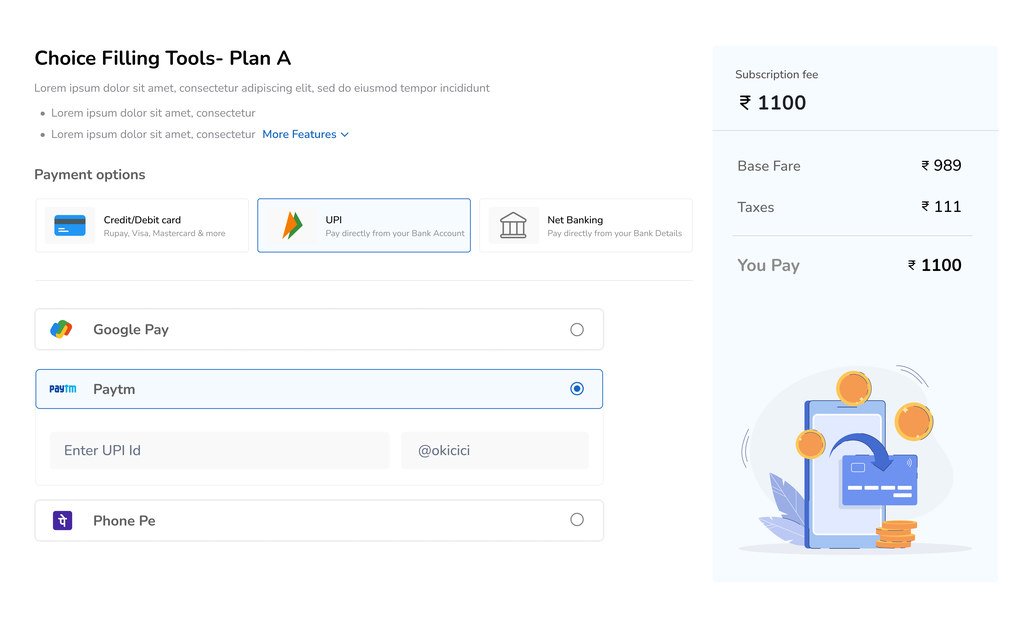
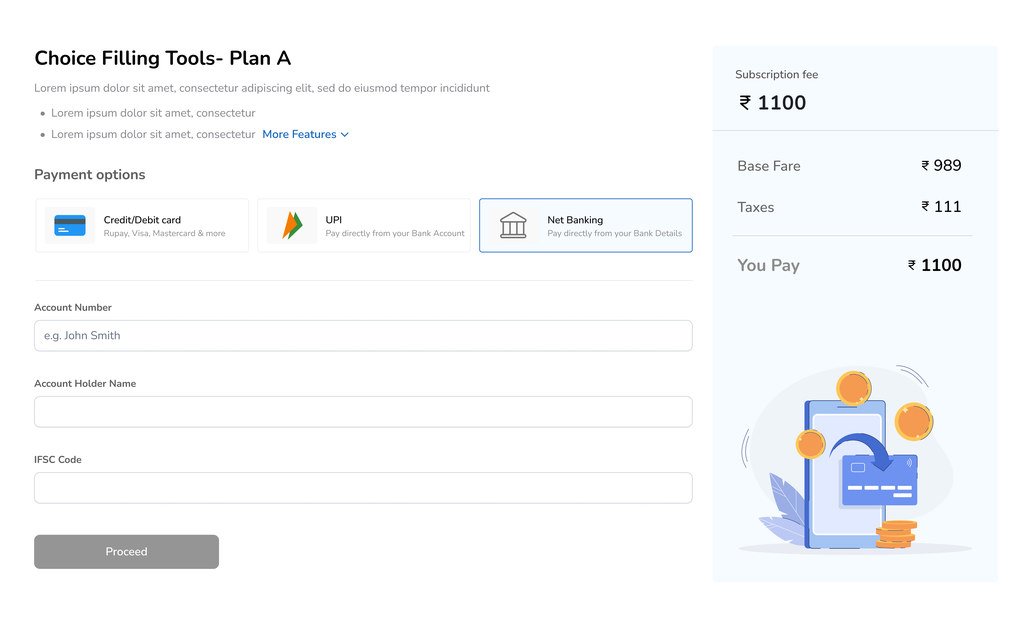
Final UI / Packages and payment
Paying for the parts that need a human.
The tools are sold as packages, and counselling as plans. Both say what is included before the price, and the checkout shows the fare, the taxes and the total separately.
Scroll or use arrow keys
11 / Usability testing
I tested whether users understood the experience, not just whether they could complete it.
I tested the high-fidelity interactive prototype, looking at navigation and task completion, how easily people learned the key modules, friction across the counselling journey, and how useful the core features were before development.
What worked: most participants found the interface clean, organised and easy to navigate. They understood what was free and how the move to paid counselling worked, without much confusion. And they valued having college prediction, comparison and preference management in the same product.
These results gave me confidence in the information architecture and the overall product direction.
25
Medical aspirants
10
Parents
35
Participants in total
12 / Where the experience fell short
Testing revealed a learnability problem I hadn’t fully accounted for.
About 50% of first-time users needed extra guidance. People who had never used a counselling platform needed help understanding modules like College Predictor and Choice Filling. They could usually find the feature, but they didn’t always know how to use it with confidence. So the problem wasn’t navigation. It was learnability.
70–80% wanted to try Choice Filling before paying. Most participants wanted to try the Preference Builder before relying on it during real counselling. That pointed to a second issue: people needed to see the value before committing.
Rather than pushing the premium feature harder, I saw a chance to let people try a limited version first.
13 / Iteration
Instead of redesigning the whole product, I focused on the friction testing uncovered.
-
Guidelines & video tutorials
First-time users could open short guides and tutorials right next to unfamiliar features.
Why: to shorten the learning curve without adding instructions to every screen.
-
A free Choice Filling trial
Guest users could try a limited version of Choice Filling.
Why: so people could understand the feature before paying for it.
-
Up to 3 colleges in the trial
Users could build a short preference list and try the core interaction.
Why: a realistic trial shows value better than a feature description.
-
A contextual payment moment
When users reached the trial limit, the premium upgrade appeared.
Why: the upgrade came after people had seen the value, not before.
14 / Balancing user and business goals
The best moment to ask for payment came after people had used the product.
Rather than choose one over the other, I designed a limited trial. Users could try the Choice Filling flow with up to 3 colleges before reaching the premium limit. That gave them enough to see the value, while keeping the full premium offering protected.
15 / Outcomes
The changes improved both understanding of the product and the paid journey.
+15%
Increase in paid conversions
Adding the limited trial before the premium limit contributed to stronger conversion.
80%
Reached the payment step
Most users who tried the trial went on to the payment stage.
45%
Completed the upgrade
Users went from trying the limited product to buying the premium experience.
100%
Premium value protected
The free experience showed what the product could do without giving away the full premium features.
One design decision met two needs: it gave users confidence before paying, and kept a real reason to upgrade.
16 / What I learned
What I learned
-
Understand the domain before simplifying it.
NEET counselling has rules, quotas, categories, cut-offs and processes that aren’t obvious from the outside. Taking the time to understand them early led to better product decisions later.
-
Complexity needs structure, not just simplification.
The goal wasn’t to remove important counselling information. It was to break a complicated journey into smaller decisions and show information when it becomes relevant.
-
Research is useful when it changes the product.
The most valuable findings weren’t the ones that confirmed what I already believed. They were the ones that changed the experience, especially around comparison, guided onboarding and building a preference list.
-
Product design goes beyond screens.
Some of the most important decisions here were about information architecture, feature access, trial limits, user education and monetisation, not visual styling.
-
Validation doesn’t end with the first usable version.
Testing showed that an interface can be easy to navigate while some of its ideas are still hard to grasp. So I check two things: can people use it, and do they understand why and when to use it?